
In this tutorial, we will create a Flappy Bird style game using MadBot AI Studio. Instead of pressing a keyboard key, we will control the bird using a hand gesture. When the player shows an open palm, the bird will move upward. When the gesture is not detected, the bird will move downward like gravity.
This project is a fun way to learn how AI gesture recognition can be used to control games.
Project Overview
In this game, a parrot will fly through moving pipes. The player has to control the parrot using hand gestures and avoid touching the pipes.
Game Control
| Gesture | Action |
|---|---|
| Open Palm | Bird moves up |
| No gesture / hand not detected | Bird moves down |
What You Will Learn
By making this project, students will learn:
- How to use MadBot Pose AI / Gesture Detection
- How to turn the camera on
- How to detect hand gestures
- How to control a sprite using gestures
- How to create moving obstacles
- How to add score in a game
- How to stop the game when the bird touches the pipe
Requirements
To make this project, you need:
- MadBot AI Studio
- MadBot Pose AI extension
- Camera/Webcam
- Parrot sprite
- Pipe sprite
- Space or night sky backdrop
Step 1: Create the Pipe Sprite
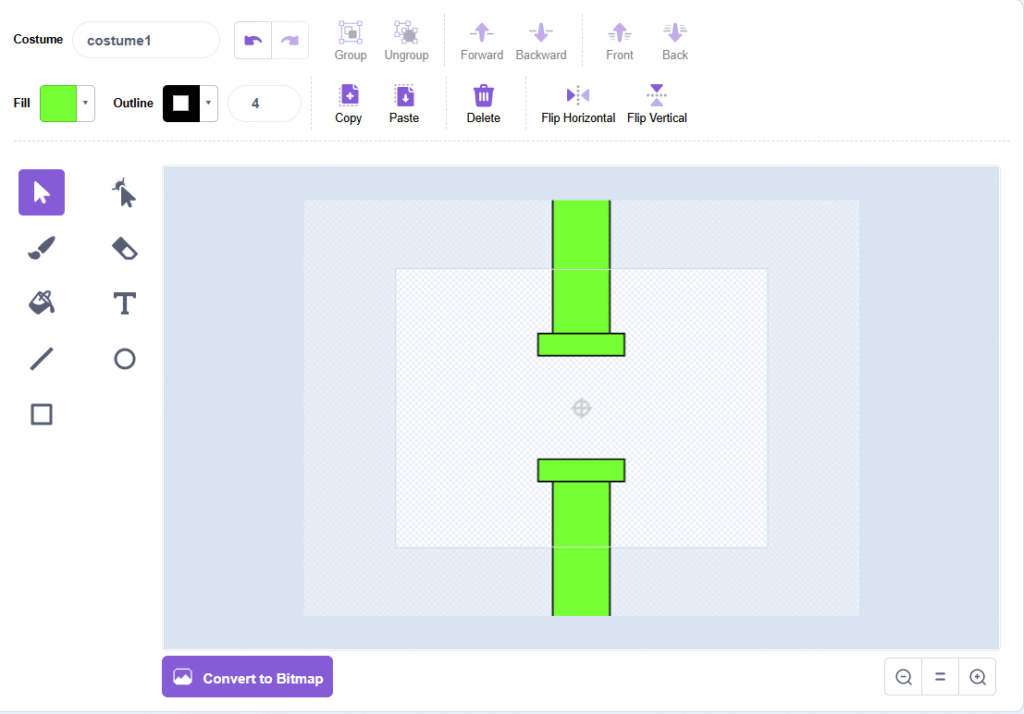
First, create a pipe sprite using the costume editor.
Draw two green pipe parts:
- One pipe from the top
- One pipe from the bottom
- Keep some empty space between both pipes so the bird can pass through
This empty space will work as the path for the bird.
Step 2: Add the Parrot Sprite
Now add a Parrot sprite. This sprite will work as our bird.
Set the parrot size to around 30 so it can easily pass through the pipe gap.
Place the parrot on the left side of the stage.
Example position:
x = -160
y = 0
Step 3: Add the Background
Choose a background for your game. You can use a space, sky, or night background.
In this project, we used a space background, which makes the game look more attractive.
Code for Parrot Sprite
Select the Parrot sprite and add this logic.
Parrot Movement Logic
When Green Flag Clicked
Go to x: -160 y: 0
Start MadBot Pose AI
Turn Camera On with Transparency 80%
Set hand points show and hand lines show

Forever
    If right hand gesture open palm detected
        Change y by 10
    Else
        Change y by -10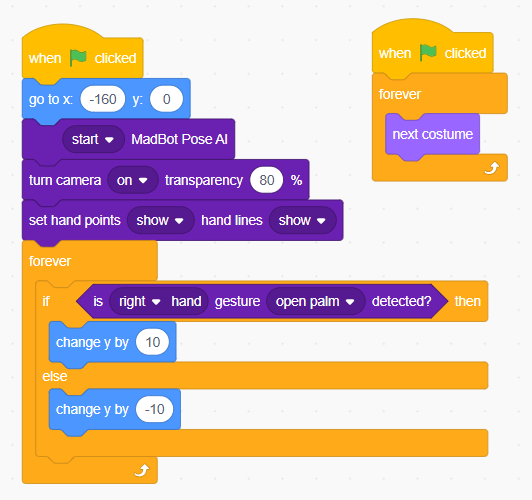
Explanation of Parrot Code
When the green flag is clicked, the parrot starts from the left side of the screen.
Then, MadBot Pose AI starts and the camera turns on. The hand points and hand lines are shown so the player can see that the AI is detecting the hand.
Inside the forever loop:
- If the right hand open palm gesture is detected, the parrot moves upward.
- If the gesture is not detected, the parrot moves downward.
This creates a Flappy Bird style movement.
Animation Code for Parrot
To make the parrot look like it is flying, add this small animation code:
When Green Flag Clicked

Forever
    Next Costume
This will continuously change the parrot costume and create a flying effect.
Code for Pipe Sprite
Select the Pipe sprite and add this logic.
Pipe Movement Logic
When Green Flag Clicked
Set Score to 0

Forever
    Go to x: 280 y: pick random -90 to 90

    Repeat 56
        Change x by -10

        If touching Parrot
            Play sound Crunch until done
            Stop all

    Change Score by 1
    Start sound Coin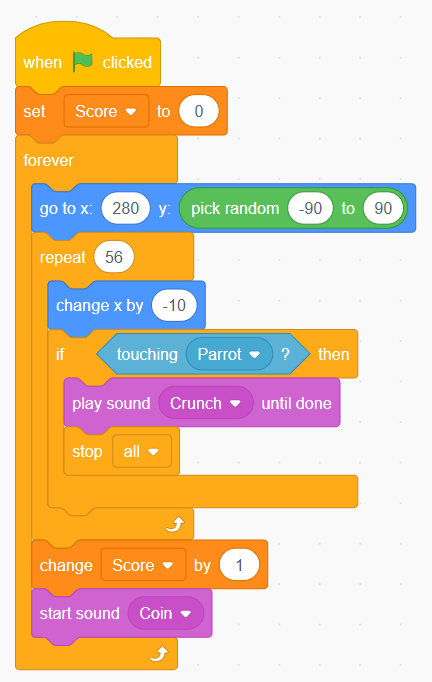
Explanation of Pipe Code
When the green flag is clicked, the score is set to 0.
The pipe starts from the right side of the screen at:
x = 280The y-position is randomly selected between -90 to 90, so every pipe appears at a different height.
The pipe then moves from right to left using:
Change x by -10If the pipe touches the parrot, the game plays a crash sound and stops.
If the parrot safely passes the pipe, the score increases by 1 and a coin sound plays.
Final Game Working
After completing the code:
- Click the green flag.
- Show your right hand to the camera.
- Show an open palm to make the parrot fly up.
- Remove the gesture or close your hand to make the parrot move down.
- Avoid touching the pipes.
- Score increases when the parrot passes the pipe.
Game Challenge
Try to score as high as possible without touching the pipes.
You can also improve this game by adding:
- Game Over screen
- Start button
- Difficulty levels
- More pipe designs
- Background music
- High score system
- Different bird characters
Conclusion
In this project, we created a gesture controlled Flappy Bird game using MadBot AI Studio. This project shows how AI and hand gesture recognition can be used to control games without using a keyboard or mouse.
This is a great beginner-friendly project for students to understand AI-based interaction, game logic, and gesture control.